
Integrated Contact Management
Smart Contact Management Features and Integrations to Enhance Productivity
Team: Designer, Developers, Growth Team | Duration: 4 Months
Problem
At Leapon, Over 70% of professionals were facing challenges managing interactions across various apps, resulting in low productivity and forgotten follow-ups, leading to underutilized connections.
We discovered that users were having difficulty acting on leads generated from events and in-person meetings via lead generation forms. This inefficiency hindered their ability to effectively leverage their networks and achieve a return on investment (ROI).
Design Challenge
How can we integrate fragmented tools like email, note-taking, reminders and scheduling into a seamless experience to help users manage professional interactions efficiently while ensuring a straightforward implementation for the tech/IT team?
Outcomes
15-30 min
follow-up achieved, instead of the 2-7 days as per existing processes
2X
Conversion Rate
Research and Ideation
Persona: Understanding Users
When I began as a product designer, the initial MVP for the digital business card had already been launched, and initial customers were using it. We consolidated user personas based on our research to segment and trace their journeys, including professionals like freelance consultants, early-stage founders, and team managers or leaders.


Identify Customer jourrney
To understand the user journey, I attended trade shows, in-person meetings, and workshops where the customer journey began. I conducted interviews to analyze their actions and spoke with various founders to understand their problems. During the mapping process, we also audited existing professional tools to assess their connection to management and nurturing. This audit helped identify various nuances of the user journey and created common pathway touchpoints and tools.

Insights
While analyzing their journey and tool usage, along with input from our product manager and CX strategist, our observational and qualitative data led us to these three insights:
-
Fragmented Tools: After analyzing their journey and conducting the audit, we found that users were juggling between multiple applications to manage their contacts, leading to inefficiencies.
-
Productivity Issues: The constant switching between apps hampered productivity, causing delays in follow-ups and leading to missed opportunities.
-
Missed Follow-ups: Users often forgot to follow up on leads generated from events and in-person meetings, resulting in underutilized connections and lower ROI.
Proposed Direction
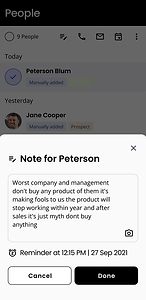
A centralized platform will streamline contact management by integrating tasks like email, scheduling, reminders, and note-taking. This eliminates the need to switch between multiple tools, saves time, and reduces cognitive load. The platform serves as a unified hub, allowing professionals to focus on building relationships instead of managing fragmented systems.
Unified Contact Management
Enhanced Productivity
-
Automated Follow-Up Reminders: Ensures timely follow-ups, preventing missed opportunities.
-
Integrated Scheduling Tools: Simplifies meeting coordination within the platform, reducing delays.
Smart Reminders and Logs
-
Smart Notifications: Tailored reminders based on lead type and interaction frequency.
-
Interaction History Logs: A detailed record of past communications for personalized follow-ups.
Note: This project will focus solely on the contact management and integration components.
Solution: How did we solve it?
Streamlined Contact Management flow and Integration
This chart illustrates the workflow of consolidating contact management into a centralized platform. It integrates Google, Outlook, and other accounts for seamless synchronization of emails and scheduling. Users can take actionable steps directly within the platform, such as adding notes, setting reminders, sending emails, and coordinating schedules.

Initial Wireframes
I designed the initial flow wireframes based on thorough research and insights from the founder and the team. Our primary focus was to enhance the holistic user experience throughout their journey. I ensured that our designs aligned perfectly with the users' decision-making processes, making the interface intuitive and user-friendly.

User Testing
Gorilla testing
At Leapon, we conducted ground-level testing during stalls and exhibitions to observe user behavior and gather real-time feedback. This hands-on experience provided valuable insights into how users interacted with our platform and highlighted areas for improvement. Collaborating with the team in such a dynamic environment offered a deeper understanding of user needs and preferences.
Learnings
-
Action Button Placement: Initially, action buttons were located on the contact page. After observing user behavior, we moved them to the contact details page. This change allowed users to access all actions and logs intuitively after clicking on a contact.
-
Simplified Integration:
Initially, users had to complete two steps to integrate email and calendar accounts separately. Feedback prompted us to streamline this into a single-step integration for Google or Outlook, combining both functionalities seamlessly.
-
Contact Organization:
Users suggested the ability to load contacts by dates and tags. Incorporating this feature improved contact management and enabled more personalized interactions.
-
Improved Contact Loading Speed:
The contact loading speed from digital business cards was initially slow. This issue was addressed by developers, ensuring faster and more efficient performance.
-
Revised Contact Display:
We replaced the "Name and Designation" header with "Name, Tags, and Date of Connection." This adjustment aligned with user preferences, making it easier to navigate and understand connections at a glance.
Integrated Tool
We have implemented all the findings and insights from multiple research studies and interactions with users. Through a series of brainstorming sessions, we were able to ideate and develop innovative solutions that address the needs and preferences of our target audience.
By leveraging user feedback and data-driven research, we have crafted strategies that enhance user experience, improve functionality, and foster meaningful connections. Our collaborative approach ensured that every aspect of our product was meticulously designed to meet the highest standards of quality and performance.


Initially, these action buttons were on the contact page. We moved them to the contact details page. This change allowed users to access all actions and logs intuitively right after clicking on a contact, significantly improving the user experience.
Initially, these action buttons were on the contact page. We moved them to the contact details page. This change allowed users to access all actions and logs intuitively right after clicking on a contact, significantly improving the user experience.


Learnings: What did we learn?
Early Communication and Feedback
Using flows and low-fidelity sketches facilitated early discussions and feedback, ensuring alignment before detailed design work began. This saved time and effort, ensured all stakeholders were aligned, and allowed us to validate initial designs with users.
Data-Driven Design
I realized the importance of leveraging both qualitative and quantitative data to inform our design decisions and validate assumptions, ensuring a user-centered approach. Since we were early in the project, not every point had quantitative data, so we relied heavily on multiple validations through qualitative data.
Iterative Problem-Solving
Initially, the problem seemed large, but by breaking it down into smaller experiments, we were able to quickly validate assumptions and develop a robust final product with all the required integrations.